
1. Introduction
Biostatistics plays an essential role in biological research, healthcare, biotechnology, microbiology, zoology, botany, and environmental sciences. Researchers frequently collect experimental data and use statistical methods to identify differences, relationships, and patterns among variables.
RStudio is a widely used integrated development environment (IDE) for the R programming language. It provides a user-friendly workspace for importing datasets, performing statistical calculations, generating graphs, and interpreting analytical results.
For beginners, RStudio offers an effective platform for learning basic biostatistical analysis without relying entirely on commercial statistical software. This tutorial explains how to use RStudio step by step, including data entry, descriptive statistics, hypothesis testing, ANOVA, and graphical representation.
2. Definition of RStudio and Biostatistical Analysis
What is RStudio?
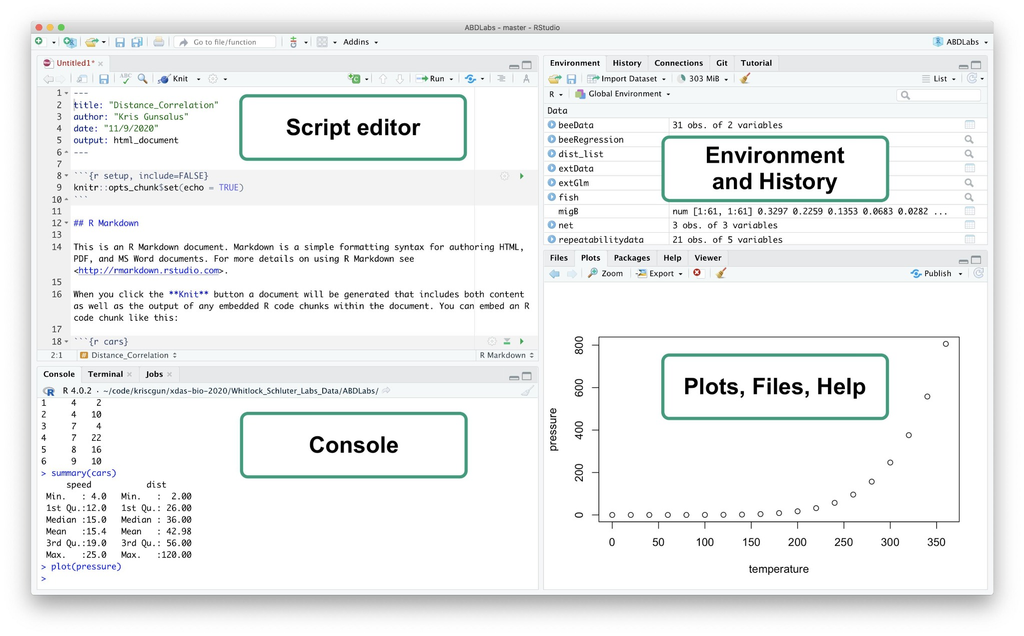
RStudio is an integrated development environment designed to simplify programming with R. It provides a script editor, console, environment viewer, file browser, and plotting panel in one interface.
What is Biostatistical Analysis?
Biostatistical analysis is the application of statistical methods to biological, medical, and life science data. It helps researchers summarize observations, compare experimental groups, test hypotheses, and draw scientific conclusions.
Examples include:
- Comparing plant growth under different treatments.
- Evaluating the effectiveness of biological extracts.
- Studying microbial growth patterns.
- Analysing mortality rates in larvicidal experiments.
- Comparing biochemical parameters between experimental groups.
3. Understanding the RStudio Interface
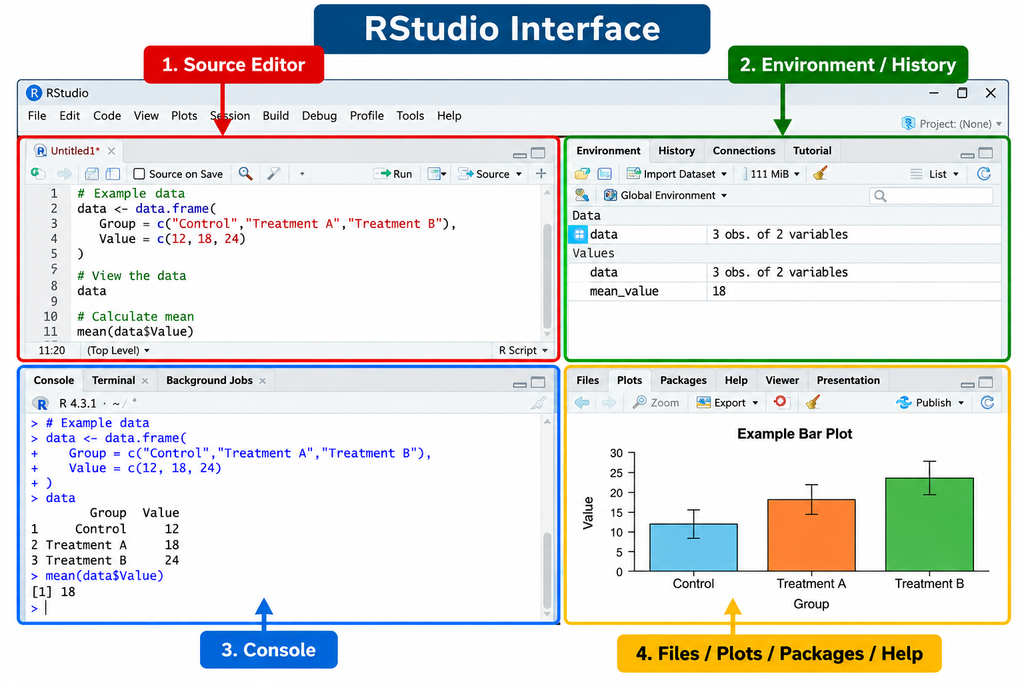
When RStudio is opened, the workspace generally contains four important panels.
| Panel | Function |
|---|---|
| Source Editor | Writing and saving R scripts |
| Console | Executing R commands |
| Environment / History | Viewing datasets, variables, and previous commands |
| Files / Plots / Packages / Help | Managing files, displaying graphs, and accessing documentation |
Tip: Write commands in the Source Editor and execute them using Ctrl + Enter on Windows.
4. Step-by-Step Basic Biostatistical Analysis
Step 1: Install and Open RStudio
First, install R from the official CRAN website and then install RStudio Desktop.
- Open RStudio.
- Create a new R script.
- Save the script as
Basic_Biostatistical_Analysis.R. - Enter the statistical commands in the editor.
Step 2: Enter Biological Experimental Data
Consider a simple experiment investigating plant growth under three different treatments.
The following dataset contains plant height measurements in centimetres.
# Create experimental dataset

Treatment <- factor(rep(c("Control",
                          "Treatment A",
                          "Treatment B"), each = 5))

Height <- c(12, 14, 13, 15, 11,
            18, 20, 19, 21, 17,
            22, 24, 23, 25, 21)

data <- data.frame(Treatment, Height)

print(data)
The dataset contains 15 observations divided into three experimental groups.
Step 3: Calculate Descriptive Statistics
Descriptive statistics summarize the main characteristics of experimental data.
Important measurements include:
- Mean: Average value of observations.
- Median: Middle value of ordered observations.
- Standard deviation (SD): Measure of data variability.
- Minimum and maximum: Lowest and highest observations.
R code:
# Overall descriptive statistics

mean(data$Height)
median(data$Height)
sd(data$Height)
min(data$Height)
max(data$Height)

# Summary of the dataset

summary(data)
To calculate mean and standard deviation for each treatment:
aggregate(Height ~ Treatment,
          data = data,
          FUN = mean)

aggregate(Height ~ Treatment,
          data = data,
          FUN = sd)
Step 4: Perform an Independent Samples t-Test
A t-test is used to compare the means of two independent groups.
For example, researchers may compare plant height between Control and Treatment A.
subset_data <- subset(data,
                      Treatment != "Treatment B")

t.test(Height ~ Treatment,
       data = subset_data)
Interpretation:
- If p < 0.05, the difference is statistically significant at the 5% level.
- If p ≥ 0.05, the analysis does not provide sufficient evidence of a significant difference.
The t-test assumes independent observations and, for the conventional Student t-test, approximately normal data within groups and equal variances. Welch’s t-test is the default in R and does not require equal variances.
Step 5: Perform One-Way ANOVA
One-way ANOVA is used to compare the mean values of three or more independent groups.
In this example, the objective is to determine whether plant height differs significantly among Control, Treatment A, and Treatment B.
# One-way ANOVA

anova_result <- aov(Height ~ Treatment,
                    data = data)

summary(anova_result)
Interpretation:
| p-value | Statistical interpretation |
|---|---|
| p < 0.05 | Significant difference among group means |
| p ≥ 0.05 | No statistically significant evidence of differences |
If ANOVA indicates significance, Tukey’s HSD test can identify which treatment pairs differ.
TukeyHSD(anova_result)
ANOVA assumes independent observations, approximately normal residuals, and homogeneous variances. Experimental design and assumptions should be evaluated before drawing conclusions.
5. Data Visualization in RStudio
Graphs are essential for presenting biological findings clearly. RStudio supports several types of statistical plots.
Example: Bar Graph with Standard Deviation
# Calculate group means and SD

means <- aggregate(Height ~ Treatment,
                   data = data, mean)

sds <- aggregate(Height ~ Treatment,
                 data = data, sd)

# Create bar graph

bp <- barplot(means$Height,
              names.arg = means$Treatment,
              col = "skyblue",
              ylim = c(0, 30),
              ylab = "Plant Height (cm)",
              xlab = "Treatment",
              main = "Effect of Treatment on Plant Growth")

# Add SD error bars

arrows(bp,
       means$Height - sds$Height,
       bp,
       means$Height + sds$Height,
       angle = 90,
       code = 3,
       length = 0.08)
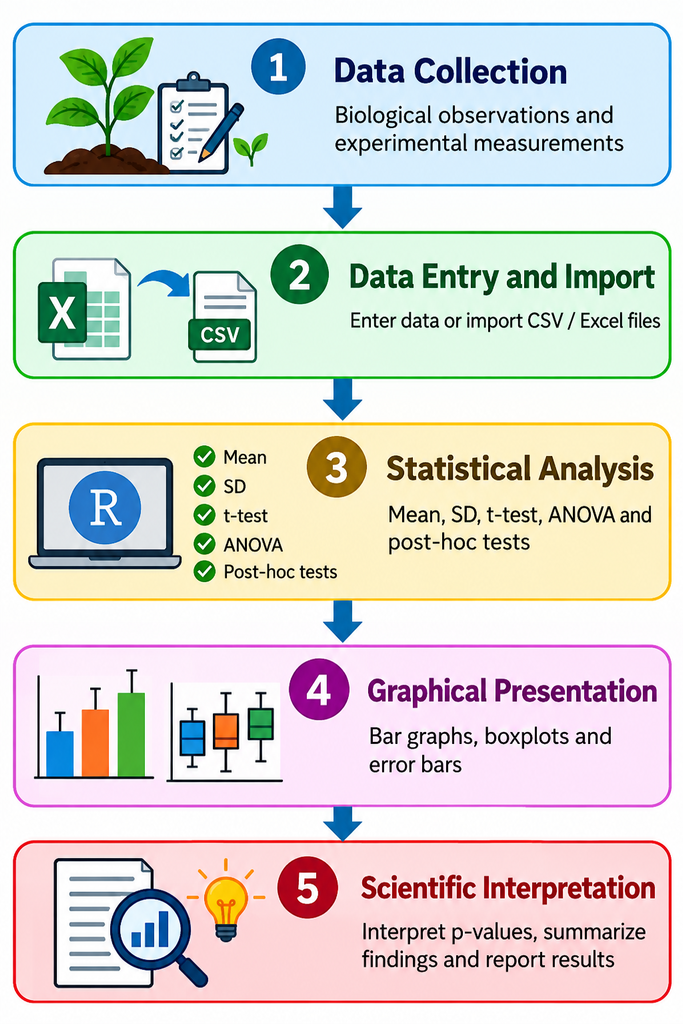
Figure 1. Workflow of Basic Biostatistical Analysis Using RStudio
6. Example of Statistical Results Presentation
The following table presents illustrative results for the plant growth dataset.
Table 1. Descriptive Statistics of Plant Height Under Different Treatments
| Treatment | Mean ± SD (cm) | Sample Size |
|---|---|---|
| Control | 13.00 ± 1.58 | 5 |
| Treatment A | 19.00 ± 1.58 | 5 |
| Treatment B | 23.00 ± 1.58 | 5 |
Values are presented as mean ± standard deviation.
The descriptive results indicate that Treatment B produced the highest average plant height, followed by Treatment A and Control. Statistical significance should be established using an appropriate inferential test rather than descriptive values alone.
7. Exporting Results from RStudio
RStudio allows researchers to save analytical results and graphical outputs for reports, research articles, and thesis preparation.
Save the dataset as CSV:
write.csv(data,
          "Biostatistical_Data.csv",
          row.names = FALSE)
Save a graph as PNG:
png("Plant_Growth_Graph.png",
    width = 1200,
    height = 900,
    res = 150)

barplot(means$Height,
        names.arg = means$Treatment,
        col = "skyblue",
        ylab = "Plant Height (cm)",
        xlab = "Treatment")

dev.off()
The exported files can be used in Microsoft Word, Excel, PowerPoint, and scientific manuscripts.
8. Advantages of Using RStudio for Biostatistics
- Free and open-source statistical computing environment.
- Suitable for biological and medical research.
- Supports descriptive and inferential statistics.
- Produces customizable scientific graphs.
- Enables reproducible analysis through saved scripts.
- Supports advanced statistical packages for future research.
- Useful for students, researchers, and PhD scholars.
9. Conclusion
RStudio is a powerful and flexible platform for performing basic biostatistical analysis in biological research. By learning data entry, descriptive statistics, t-tests, ANOVA, and graphical visualization, beginners can develop essential statistical skills for analysing experimental observations.
Its script-based approach improves reproducibility and allows researchers to modify analytical procedures according to their research objectives. With regular practice, RStudio can become an effective tool for academic projects, dissertations, research publications, and advanced biostatistical investigations.
For students and researchers in life sciences, learning RStudio is an important step toward accurate data analysis and scientific reporting.